Business · 7 min read
Keeping customer information secure in a small business
Practical steps for customer-data security, from collecting less and controlling access to safer sharing, retention and an incident response plan.
General U.S. business education, prepared with AI assistance and independent AI factual review. Not legal advice, a cybersecurity audit, certification or a guarantee of security. Requirements depend on the data, jurisdiction, industry and circumstances.
Information may contain errors, omissions or outdated guidance. This article is general education, not individual medical or other professional advice. Verify important information before acting and consult an appropriately qualified professional. Never disregard medical advice, delay care or change treatment because of this article. See our accuracy disclaimer and terms.
Start with one customer interaction
A customer calls, makes a booking, sends an invoice query or leaves a form at the counter. Where does that information go next? For a small business, following one ordinary interaction can reveal more than starting with a long shopping list of security products.
Imagine a fictional repair shop that receives a name and phone number, records a job and sends a completion notice. The owner could trace that record through the booking system, a printed work slip, an employee’s messages and the final invoice. Each location creates a practical question: is the information needed there, who can see it, and what happens when the job ends?
The steps below are general U.S. business guidance and proposed working practices, not a security audit or a finding that any particular company meets legal requirements. Start with a manageable service or workflow, then expand the review. Include paper, phones and outside providers as well as the main computer.
Make a short inventory and name an owner
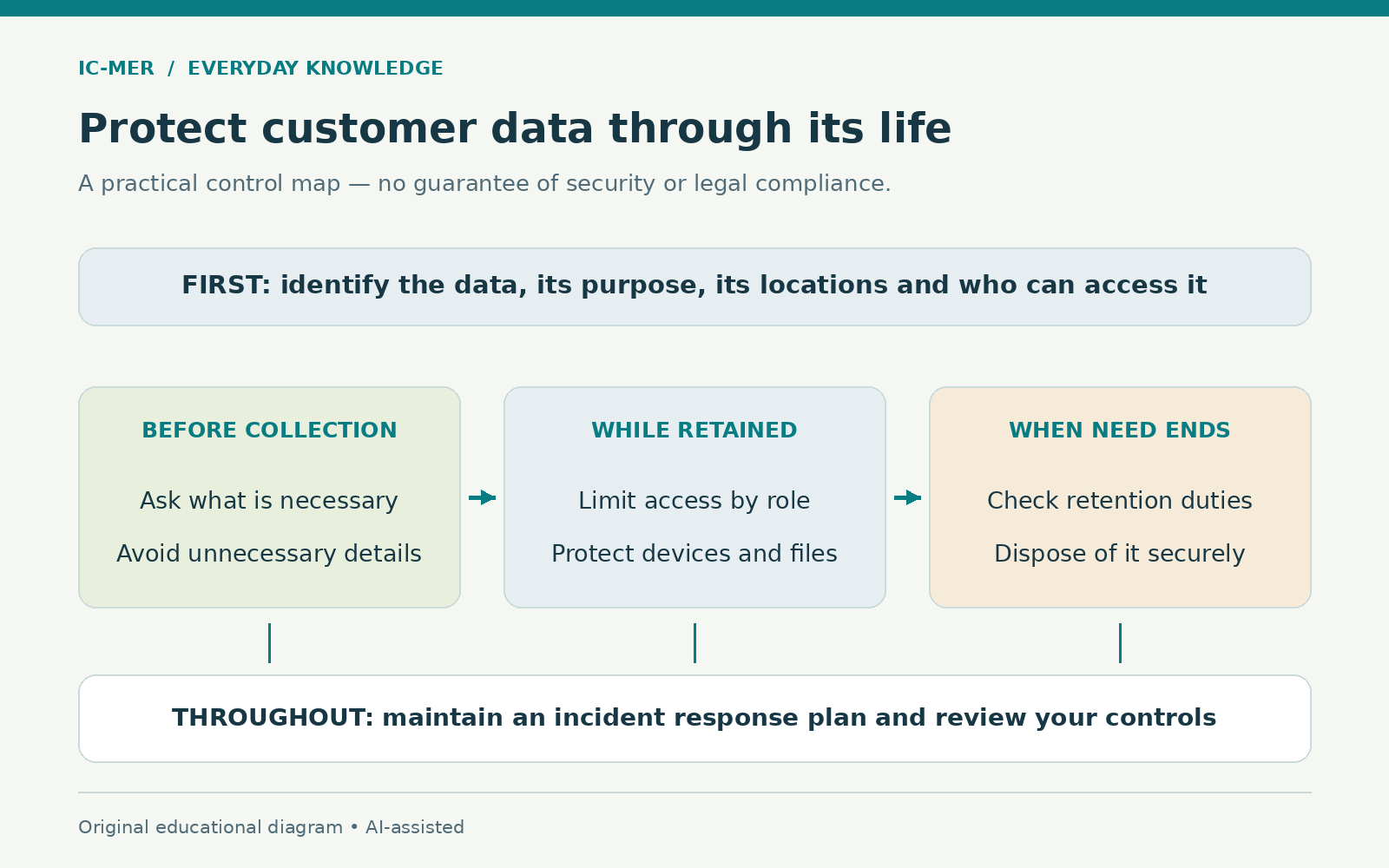
The FTC recommends understanding what personal information a business holds, where it is kept and who can access it. It also advises collecting only information with a legitimate business need and limiting access to what each job requires.
For the repair-shop example, a working inventory could have columns for the information, its purpose, the system or cabinet, the person responsible and the people who need access. Write down what actually happens. A beautifully designed procedure is not useful if staff routinely keep the working copy somewhere else.
Give each unresolved item a named owner and a next step. “Check who can open the old booking export” is more actionable than “improve privacy.” Do not include customers’ actual sensitive details in the inventory itself. A description of the data type and location is normally enough for this planning exercise.
Sources: [1]
Question each field before adding another
The FTC’s Start with Security guide encourages businesses to avoid unnecessary collection and to use fictitious information for training or development when real personal information is not needed. Extra fields can create extra exposure without improving the service.
Read a customer form from the customer’s perspective. Can you explain why each field is there? Does the question belong at this stage of the transaction? Who uses the answer? For the fictional repair shop, a booking reminder may need a chosen contact method; that does not explain a request for a customer’s unrelated account password.
Put proposed changes through the person responsible for the business process. Some information has an actual accounting, contractual or legal purpose. The objective is a justified collection decision, not indiscriminate deletion. When testing a revised form, use clearly invented examples so the test does not create another collection of real customer records.
Sources: [2]
Give people their own appropriate access
Separate user accounts and sensible limits on administrative privileges help control access. Review access for staff and contractors when their responsibilities change, and remove access that is no longer authorized. A shared password makes it harder to apply those distinctions.
Make a small role list: who needs to schedule work, who handles invoices, who administers the service and who can export customer records? The same person may hold several responsibilities in a tiny business, but the responsibilities still need to be understood. Ask a competent IT provider to configure the permissions rather than assuming the product’s defaults match your intentions.
Test a routine task using the intended ordinary account. Can the worker complete the job without using an administrator login? Can they see records unrelated to that job? Keep a note of the problem and the approved fix. Do not use live sensitive records as a casual demonstration for everyone in the room.
Sources: [2]
Protect accounts and the devices that use them
NIST recommends multi-factor authentication on accounts that offer it, with preference for phishing-resistant methods, along with strong passwords and consideration of a password manager. It also advises software updates, maintained security software and protected backups that are tested.
Begin with the accounts that provide broad access, such as business email and the customer-record system. Ask your provider which authentication options are supported and how authorized recovery works. Keep recovery arrangements under appropriate business control so that one lost device or departing worker does not leave the owner locked out.
Give maintenance an owner and a routine. Who checks failed updates? Who knows which devices are still supported? Who can demonstrate that an appropriate backup can be restored? A subscription receipt answers none of those questions. Record the date and result of a real check, with any unresolved problem assigned for follow-up.
Sources: [3]
Make the ordinary handoff safer
The FTC advises protecting sensitive information in storage and transmission, and keeping paper records physically secure. Encryption does not remove the need to select the correct recipient or limit who is authorized to open a file.
Choose an approved method for sharing information with customers, bookkeepers and service providers. Before sending, check the intended recipient, the contents and the access setting. If a file-sharing product permits access to anyone with a link, do not assume that setting is appropriate for a customer record. Ask for help configuring the service when the options are unclear.
Use a fictional practice task to teach the handoff. Have a worker identify the correct recipient and select the approved sharing setting, then explain how access would end. At the counter, consider where completed forms wait and whether another customer can read a screen or paper. Small physical details belong in the same review as digital settings.
Sources: [1]
Ask providers concrete questions
A provider’s involvement does not make its access irrelevant. The FTC advises considering service-provider security and restricting access to sensitive information that is not needed for the service.
Prepare a short list before choosing or reviewing a booking, storage or support provider. What data will it receive? Who within your business can change permissions? How are accounts closed and records exported? Who should receive a security alert? Which obligations are in the agreement, and which are merely assumptions someone made during setup?
Keep the answers with the service record, including the date and source of the answer. If a salesperson cannot answer a technical question, ask for documentation or a qualified contact. Avoid turning an unanswered question into a reassuring sentence in your own policy. A useful review can end with an open item that needs resolution.
Sources: [2]
Choose when and how information leaves
A written retention approach should identify what must be kept, how it is protected, how long it is needed and how it will be disposed of securely. Legal or business recordkeeping requirements can affect that decision.
For each record type, identify the person who approves the retention rule and the person who carries it out. Include old exports, paper copies and records held by a provider. Do not assume deleting a desktop shortcut removes the underlying data, or that removing a live record immediately removes every backup copy.
When a retention period is uncertain, record that uncertainty and get suitable advice. Do not schedule a large deletion merely to make a dashboard look tidy. Equally, “keep everything forever” is not a substitute for deciding what the business needs and can protect.
Sources: [1]
Prepare a response card before an incident
The FTC advises prompt action after a breach, preservation of relevant evidence and involvement of appropriate technical and legal expertise. Notification duties depend on the facts and applicable law; there is no single universal deadline that this general guide can supply.
Create a contact card with the business decision-maker, IT or security support, relevant provider contacts and the person who can assess legal obligations. Keep an accessible copy that does not depend entirely on the affected email account. Ask staff to report a suspected mistaken disclosure or suspicious account activity promptly through that route.
Do not erase devices, delete messages or improvise public assurances before the incident has been assessed. Record what was noticed and when, preserve information as advised, and follow qualified response instructions. Distinguish confirmed facts from questions. A calm, accurate record is more useful than an early guess about whether anyone was harmed.
Sources: [4]
Make the next improvement visible
Pick one workflow and close one concrete gap: an unexplained form field, an inappropriate shared account, an unclear sharing setting or an untested recovery process. Record the action and how it was checked. Then choose the next gap. This creates a manageable work list while keeping unresolved risks visible.
Revisit the list when staff, systems or services change. A small business does not need to describe itself as perfectly secure to take useful action. It needs people who know what information they handle, what is expected of them and where to get help when something goes wrong.
Sources & further reading
- FTC — Protecting Personal Information: A Guide for BusinessChecked 2026-10-23
- FTC — Start with Security: A Guide for BusinessChecked 2026-10-23
- NIST — Cybersecurity BasicsChecked 2026-10-23
- FTC — Data Breach Response: A Guide for BusinessChecked 2026-10-23
About this article
Prepared with AI assistance and an AI fact-checking pass against the sources listed above. No human clinical review is claimed. Evidence may change; consult appropriate qualified professionals for decisions about your circumstances.
Spotted a problem? Suggest a correction.