Business · 4 min read
Building a simple useful website for a small business
Start with the questions a visitor needs answered, then give someone responsibility for keeping those answers accurate.
General educational guidance for small businesses, prepared with AI assistance and independently checked by an AI reviewer. This checklist is not a security audit, accessibility certification or legal compliance review.
Information may contain errors, omissions or outdated guidance. This article is general education, not individual medical or other professional advice. Verify important information before acting and consult an appropriately qualified professional. Never disregard medical advice, delay care or change treatment because of this article. See our accuracy disclaimer and terms.
Give the visitor a useful first screen
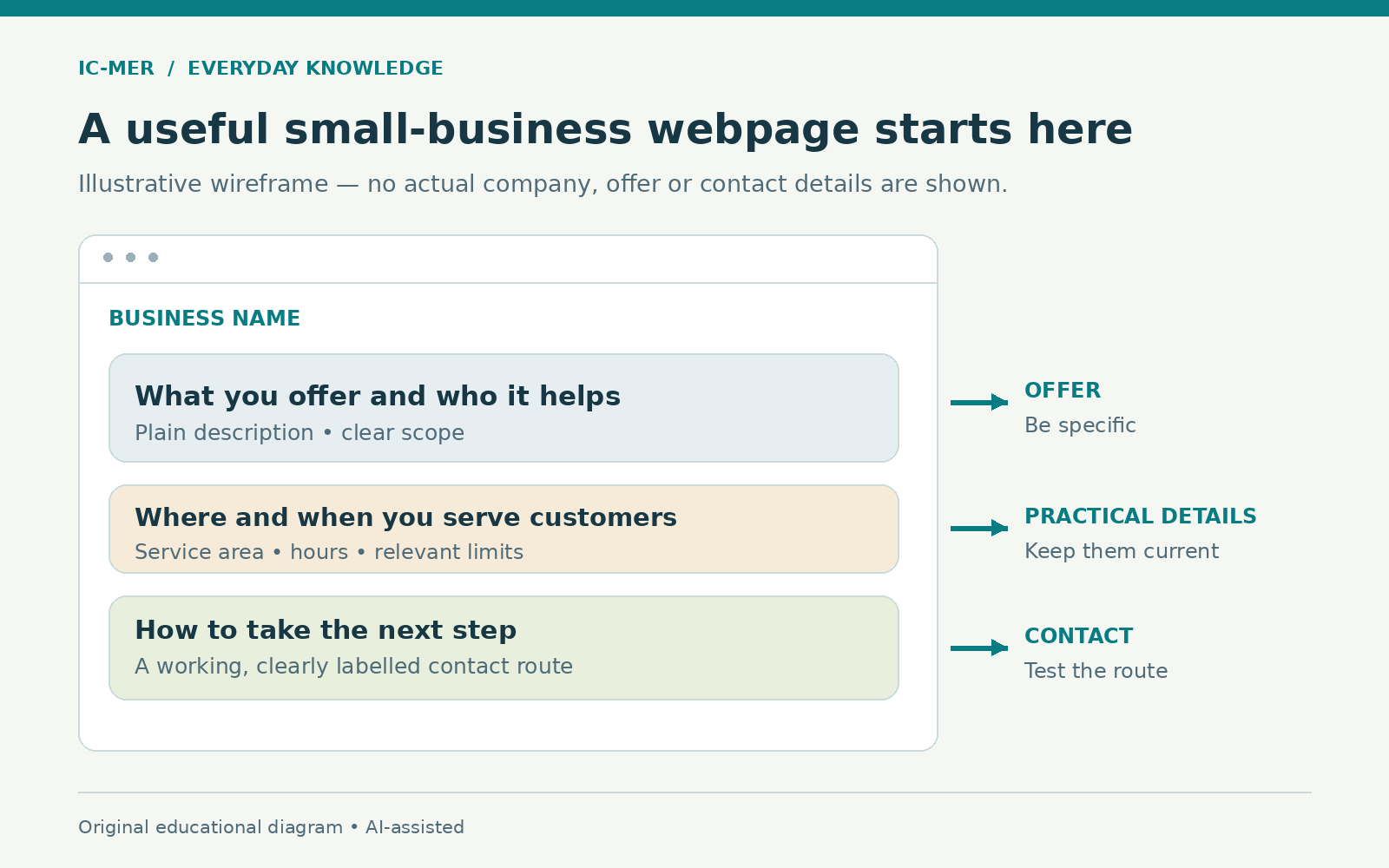
A simple business website should help someone understand what you offer, where or how you provide it, and what to do next. Write those answers before choosing decorative effects. For a fictional local repair service, the opening screen might identify the appliances it handles, its service area and how to request an assessment. Do not make a visitor search through a long company story to discover whether you can help.
Choose one main next step, such as calling during stated hours or requesting information through a supported channel. Explain whether that step confirms an appointment or only starts a conversation. The illustration is a generic planning diagram, not a real company website or a claim about likely sales.
Include the details that prevent confusion
A small site may only need a clear service description, important exclusions, accurate contact information and a short explanation of how the work begins. Add prices or a price basis when you can state them accurately. If a quote depends on an assessment, explain that instead of suggesting a guaranteed total.
FTC guidance requires advertising claims to be truthful, nondeceptive and supported by evidence. Check claims about credentials, guarantees, availability and results before publishing them. Use only images and other material you are entitled to use, and do not present a generic illustration as a photograph of your actual team or completed work. A polished design cannot make an unsupported claim reliable.
Sources: [1]
Make the words and navigation easier to use
W3C's accessibility guidance recommends descriptive page titles, meaningful headings and clear link text. Give each page a title that tells people what it contains. Use actual heading structure, not simply larger text, and label a contact link with its purpose rather than an ambiguous instruction such as click here.
Provide meaningful text alternatives for informative images and clear instructions for any form. If a photograph is only decorative, it needs different treatment from an image that communicates essential information. Keep sentences direct and explain unfamiliar terms. These are useful starting steps; they do not establish that the whole site meets accessibility standards.
Try finding the contact details on a phone and moving through the page with a keyboard. Ask someone unfamiliar with the business to explain what they think you offer. Fix obvious confusion, and seek a proper accessibility assessment where needed rather than treating a quick personal check as certification.
Sources: [2]
Collect less and protect access
Before adding a form, decide what information you actually need and who will receive it. The FTC recommends limiting unnecessary personal-data collection and protecting information that is retained. A general enquiry form should not invite sensitive health, financial or identity information without a justified, appropriately protected process. Accurately describe the site's actual data handling with qualified advice where needed.
Protect the accounts that control the website and its domain. NIST recommends multifactor authentication and notes that some methods resist phishing better than others. Enable suitable protection where available, use strong unique passwords, and limit administrative access to people who need it. No single setting makes a website immune to attack.
Check the whole contact journey before launch
Read the site as a potential customer. Are the service area, hours and limitations correct? Does the phone link reach the right number? If a form is used, does a test enquiry arrive where someone will handle it, and is the confirmation accurate? Avoid putting real sensitive customer information into a test.
Look at the finished page on a narrow screen as well as a larger one. Check that important text is readable, images do not obscure the message and the main next step is easy to find. These are practical usability checks, not measurements of search rankings or conversion rates.
Assign someone to keep it accurate
A website remains useful only if its information stays current. Name the person responsible for updating holiday hours, unavailable services, changed contact details and outdated claims. Keep a simple record of who controls the domain and hosting account, and ensure the business has appropriate authorized access.
Start with a site you can maintain. A few clear, accurate pages can support a small business better than many unfinished features. Add a booking system, payments or other functions only when you understand the operational, security and legal responsibilities they introduce. The first goal is a visitor who understands your offer and can take a reliable next step.
Sources & further reading
- Advertising and Marketing BasicsChecked 2026-10-22
- Writing for Web AccessibilityChecked 2026-10-22
- Protecting Personal Information: A Guide for BusinessChecked 2026-10-22
- NIST Small Business Fact Sheet: Multi-Factor AuthenticationChecked 2026-10-22
About this article
Prepared with AI assistance and an AI fact-checking pass against the sources listed above. No human clinical review is claimed. Evidence may change; consult appropriate qualified professionals for decisions about your circumstances.
Spotted a problem? Suggest a correction.